Child-Friendly Media Player
A solution to give a child autonomy over screen time without a tablet I have a kid. She likes watching shows. Those shows are not necessarily easy to play to a screen without controlling the system through a phone/tablet/whatever. I want to give her autonomy over choosing what to watch during her allowed time without giving her a second, smaller screen to control the bigger screen. We discussed a DVD player, but DVDs are slow, menus are awkward, and DVDs are notoriously easy for kids to destroy. We also ran into the issue of a lot of shows or movies not being on physical media. I was looking for a solution that had these requirements: After dozens of seconds of searching for a solution, I decided to make my own. The core solution was based on a NFC Hat for a raspberry pi, a big pile of 25mm circle NFC tags, and some sticker paper. We went to the library with some sticker paper and a bunch of images on a thumb drive and used their sticker-making software to print out two stickers for each show and attached them to tokens at random. After putting the stickers on the tokens, I used the demo software that came with the NFC Hat to get the token UID for each one and noted down which token ID went with which show. I put the UIDs into a config file along with either a network folder, a PBS Kids show slug, or a direct link to a file. The shows and movies that we wanted available break down into three categories: For the first (and most important) category, we need to take a look at the PBS Kids API. You can access a list of currently running shows using their show-tracking endpoint. That endpoint will show you a blob of JSON that contains the title and a “slug” for each show. Take that slug and swap it into the Some example python to grab a video link for a given stub: We have plenty of off-air PBS shows, too. Wishbone, Magic School Bus, Between the Lions, etc. For these shows, I have a network location set as the matching configuration and do a walk of the directory and pick a random episode from the pile. This one is pretty straightforward, if the mapping config file links to a specific file, just play the specific fileThe Problem

The Solution
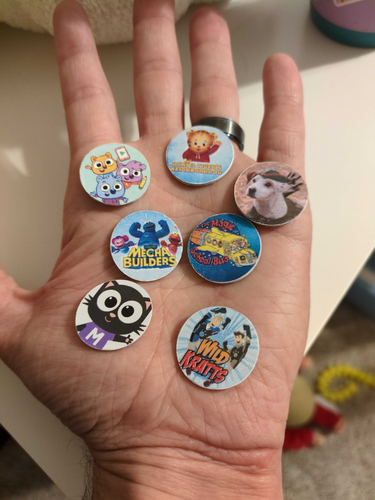
The Technical Bits
PBS Kids API
shows parameter on their show-list endpoint and you can see the list of available episodes for a given show.def get_url(stub):
url = f"https://producerplayer.services.pbskids.org/show-list?shows={stub}&page=1&page_size=50&available=public&type=full_length"
response = requests.().()
randomepisodenumber = random.(0,len(["items"])-1)
episodeurl=["items"][randomepisodenumber]["videos"][0]["url"]
return episodeurlOff-Air PBS shows
if(os.path.({ from})):
files = [os.path.(,)
for path, dirs, files in os.({ from})
for filename in files
if filename.(".mp4") or filename.(".m4v")]
return random.()Local Movies
if(os.path.({ from})):
return {path from config}